
Digital
Photography
Updated October 2013
Updated October 2013
|
|
Digital
Photography Updated October 2013 |
||||||
|
|||||||
|
Digital photography has changed my life. I mean that sincerely. Ever since October 2000, all my climbs, family reunions, Christmas, birthdays ... have been captured with a digital camera. There are many advantages over traditional film cameras and almost no disadvantages as the technology improves. This site has
several thousand pictures and videos. The Best
Shots page is one of the most popular pages on my site. Almost every
mountain climb page has pictures showing the country, the climb and
people. The emphasis is on the experience but some of the landscapes
are beautiful. Almost every image has been captured with digital
cameras and ... What is 'Digital' Photography?By now this is a silly question but if you are wondering about all the fuss, in the 'old' days (pre 2000!) almost all cameras were a mechanical device that captured an image through an opening in the lens (the shutter) to leave an impression on film. Film was made of either a cellulose acetate or a polyester base substance with a coating of light sensitive minerals - silver salts. You took this 'exposed' roll of film to your drugstore and in an hour or day you got back a paper folder full of pictures and negatives. You looked at the pictures, laughed and smiled, and then 'filed' them in the shoe box in the closet with all the others - never to be seen again! The advanced armatures only used slides.Digital cameras operates on a similar approach of capturing an image but instead of on film, they stores the image on a magnetic card the size of a postage stamp. With the image now stored as pixels, in computer lingo, you can immediately look at your image on a small screen built into the camera to decide if you like that shot or need another. You can take this storage card to the local developer to make prints or do it at home. You can store them on your home PC for easy viewing on your big screen TV (imagine seeing your Aunt nodding off at the Christmas party on the big screen!). And you can do much more ... Why should anyone be interested?This question is dated as of 2012 because I'm not sure you can still buy a film camera; but some may find it useful. How many times have you taken a roll of 36 prints only to have 5 or 6 that you really like? How many times have you heard "Take another just to be sure!" Do you often get double prints then mail a copy to friends or relatives? How many of us have shoe boxes full of slides or negatives that we dread as that retirement project? If any of these ring true, then you need a digital camera. The ability to see the picture immediately after taking it allows you to select if you need another or at a different angle. Just like a Polaroid but cheaper and easier. With today's technology it is simple to email a few of your favorites to everyone in your family or have prints made and mailed to them if they don't have email. Windows XP or Apple's iPhoto makes storing and organizing pictures simple. There is free and easy to use software the helps organize and enhance your pictures as well. I have some suggestions at the bottom of this page.What are the disadvantages of digital?Battery life can be an issue on some cameras especially those with with built in GPS. Most cameras come with rechargeable batteries, not disposable, so this is a consideration for those on long trips without easy access to electricity, for example on remote expeditions. The bigger you want your print, the more pixels are required. Some inexpensive digital cameras, even in 2012, have a lag time between the time you push the shutter button and the time it takes the picture. So sometimes a fast moving subject is blurry. The better cameras have solved this problem.What about the picture quality?The quality of the image taken with digital cameras have come a long, long way. For most people, you cannot tell if a picture was taken with film or digital when printed on high-quality paper. The prints from most photo printers and developers last over 70 years - longer than film! Here are some hints when looking at a print from a digital camera: Look at the edges of straight objects, like a wall or a post, to see if it is really straight or a little jagged. Look at the dark places on the picture; like a very dark shadow or black shirt to see if you can see speckles. This is called 'noise' and the best cameras do not have any you can see. Also look at the color starting in the center and going out to the picture edge to see if the colors are the same.Some cameras will 'shift' the color as you go out from the center so the blue sky in the middle is no longer blue. Finally, look at the colors themselves. Are the reds - red? Are the blues - blue? You might be surprised. Think about what size you will print. Small pictures (4x5 or 5x6) do not show these problems like big prints (8x10 or posters) However, don't expect a 10mp $100 camera to do as well as a $500 10mp model. How about getting prints?This is simple today. You can print them at home but most people upload them to a photo finisher on the Internet such as Picasa Web Album or take the card to your local grocery or drug store. The trade off between printing at home or taking them in is time and money (isn't it always!). Printing at home cost about 29 cents per picture on a high quality inkjet printer but is complicated and confusing to get it right. Internet developers charge anywhere from .10 to.25 for a regular print. If you print at home, be careful not to expect great quality from a standard inkjet printer. The best quality comes from printers specifically designed for photo printing and using photo paper.Today, all the major companies provide good printers so it is hard to go wrong but make sure your printer is able to match your camera's pixel count. DP Magazine does a good review of photo printers. See the tables at the bottom of this page for suggestions. If you upload them over the internet you have your prints back in a few days by mail. The grocery, drug or department store offers Internet prices with one-hour turnaround in some cases. Many developers offer the option to copy your pictures onto a compact disc (CD) for permanent storage. If you don't have a PC, no problem. Stores offer kiosks where you simply plug the camera or storage card into the device and print the picture while you wait. Some photo printers offer this same feature with built-in card slots. How do I share my photos with friends and family via the Internet?There a many sites that make it very easy to upload your pictures and notify friends and family so they can view them. Most sites allow you to specify if your photos are private or public. See the tables at the bottom of this page for suggestions. I use Picasa Web Album and find it easy and secure plus it is integrated with Picasa running on my PC so I usually have my pictures uploaded within an hour of getting home from a climb. I use Shozam to create the albums you see on my site. It is expensive but gives me complete control over the picture layout, quality and captioning.Should I care about in-camera features such as face recognition, editing and GPS?I don't think so. Manufacturers are trying to make their cameras different from their competitors by adding all sorts of features. I personally don't use any of these since I just want to take a great picture and get it home. There I will do the editing, sharing and printing. A lot of these features are gimmicks. GPS is a battery hog and think about it; do you really need to know the coordinates of where you took the picture? Evaluate a camera on ease of use and picture quality not on the clever stuff no one actually uses.I take hundreds of pictures at a time. How do I sort them for the best shots?This is a big problem for me. I will take 2,000 thousand pictures on a major climb but I only want to post a few hundred on my site. I currently use Picasa (free download). Many professionals use Adobe LightRoom or Photo Mechanic to sort, tag and organize their images. See the tables at the bottom of this page for suggestions. Some camera manufactures bundle software with their cameras but usually are not very good.I am afraid I will lose all my pictures if my PC crashesThis is a real concern. The best insurance is to back them up somewhere not in your house. I strongly suggest backing up your pictures to a USB hardrive such ReBit for PCs or Apple's Time Capsule for Mac. I no longer suggest online backup services such as Mozy due to slow performance and poor support. However with local backup, if your house burns down the back-up will go as well so for ultimate backup, store your drive away from your home and backup monthly - or buy two drives - they are cheap protection for lifelong memories.Which camera should I buy?This depends on how much you will use it. I suggest starting small and buy what you need. Don't get fooled by all the specs out there. You need to select from camera size - how it fits in your hand. How many pixels it has (see the previous discussion) but 4 mp is plenty. How much optical zoom it has - the ability to bring the entire image in your viewfinder closer. Most cameras today offer the ability to zoom in 6 times as close with some offering 25 times. There is 'digital zoom' but this does not bring the subject closer like optical, it only eliminates (crops) the surrounding area around your main subject. If you are upgrading from your first digital camera, don't just upgrade for more megapixels, look at the entire package. The technology is moving so fast that you want to get new features, lens AND better resolution when you upgrade. For example just going from a 8mp camera to 10mp with everything else the same will not get most people better pictures. See the tables at the bottom of this page for suggestions. What about in camera WiFi and GPS features?I don't like these features but understand how some people might. In my opinion they take up valuable battery capacity for not a lot of benefit. Seriously, when was the last time you took a picture and a year later wondered what the GPS coordinates were. or the last time you needed to connect your camera immediately to Facebook - that is what cell phones are for! Built in this ever-connected world, these features are meeting market demands primarily created through the connectivity of cell phones. My advice, if you buy a camera with these features, turn them off and save your battery for taking pictures.How many MP's are enough?If you want film quality prints or enlarge to poster size, you need 25 megapixels (mp) but also a high quality lens and outstanding overall design. However, for 99.999% of the picture taking public, any camera with a pixel count of 4 million (4mp) or more is adequate for a simple 4x6 prints or viewing over the internet and email. Most cameras in 2013 have 12mp to 15mp sensors. I regularly use a 6 mp camera. 4mp is plenty but almost all cameras today start at 6 or 8mp. As consumers, we always think more is better so we think that a 12mp camera must be better than a 10mp. But that is not true. Pictures are about capturing light and that is what each pixel represents on a sensor. Given a sensor of the same size , for example a fingernail, the more pixels on that size will take in more light but with less resolution or quality. So even though you may have more pixels, the overall image suffers. I am encouraged by Canon who recently reduced the pixel count in some cameras to improve overall image quality. Again 4mp is plenty and 8mp is more than enough. If you want to read more, this is a good article.What is ISO?This is as important than megapixels to some extent. ISO stands for International Standards Organization and for cameras it is a measurement of light sensitivity. In film days it was called ASA. Simply put, the higher the ISO setting, the better the picture will be in low light. The trade-off is that at the highest settings, the picture can be nosey or grainy, especially in inexpensive cameras. The rule of thumb is is to use the lowest possible ISO setting that will best image quality. If you are outdoors, set your camera to the lowest setting possible. If you want to read more, this is a nice article or just set your camera on Auto.What about those cameras in cell phones? They
are getting better with each generation. Samsung's Galaxy S4 has a
nice feature set with their latest model. It has a 13mp but no optical
zoom. Apple's iPhone 5 has an 8mp sensor, LED flash, autofocus and
many other features. It also records HD video at 1080p, 30fps. It has
optical zoom but is very poor in my experience, almost unusable. Android
phones are similar. Lower cost phones will have the usual problems
with poor pictures in low light, such as at an indoor party and lack
the clearly of a decent point and shoot camera. However, mobile phones
have taken over the mass market digital camera market on. However,
it is interesting to see how many news stories have pictures and video
from cell phones since we always have our phones with us. They
are getting better with each generation. Samsung's Galaxy S4 has a
nice feature set with their latest model. It has a 13mp but no optical
zoom. Apple's iPhone 5 has an 8mp sensor, LED flash, autofocus and
many other features. It also records HD video at 1080p, 30fps. It has
optical zoom but is very poor in my experience, almost unusable. Android
phones are similar. Lower cost phones will have the usual problems
with poor pictures in low light, such as at an indoor party and lack
the clearly of a decent point and shoot camera. However, mobile phones
have taken over the mass market digital camera market on. However,
it is interesting to see how many news stories have pictures and video
from cell phones since we always have our phones with us. I really like my traditional SLR, can I get one in digital?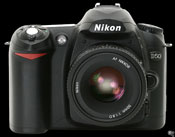 Perhaps
a dated question but the answer is absolutely. In fact as the market becomes more
commoditized, many manufactures are putting most of their effort into Digital
SLRs. With more volume and competition, the prices have dropped dramatically.
And in the last year, some models now take video. Perhaps
a dated question but the answer is absolutely. In fact as the market becomes more
commoditized, many manufactures are putting most of their effort into Digital
SLRs. With more volume and competition, the prices have dropped dramatically.
And in the last year, some models now take video.
There are many advantages to these cameras: they support their traditional analog camera lenses so you can leverage your investment (but you need the 'digital' lens to get the best performance); they are significantly faster than most digital point and shoot cameras so you really never miss a shot, the lenses and sensors are bigger thus providing superior image quality and finally, they have tons of features including true full manual mode for those photographers wanting total control over shutter speeds and aperture settings. The disadvantages are cost and ease of use. Examples include Canon's D-SLR the EOS 1Dx, an 18mp model which cost $7000.00 without lens or the more reasonable Canon Rebel T3i around $600 with lens. Nikon also is a titan in this market with their top end D4 at $6000 (body only) or the less expensive D5000 around $6000. I currently use a Nikon's D-50. It was about $550 in 2006 and supports 6mp. I use two Nikor lenses: 18-55mm and a 55-200mm. What are the new DIL or Micro Four Thirds cameras?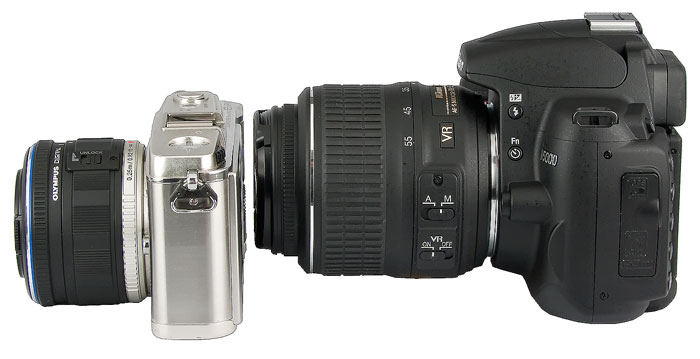 Olympus
(E-M5)and
Panasonic (Lumix
DMC-G5) broke into Canon and Nikon's strangle hold on
the DSLR market with a new format and today almost every manufacturer
including Canon (EOS
M) and Nikon (Nikon
1)offers a model. The Micro 4/3rd
is a camera with the performance of a DSLR in the size of a point
and shoot. They use a sensor size that is 9 times larger than in
a traditional point and shoot which means better image quality but
requires a new generation of lenses. The major technological difference
is that a DIL (Digital Interchangeable Lens) camera does use a mirror
inside the camera body to show the image through a viewfinder but
rather utilizes the LCD display and an electronic viewfinder. Olympus
(E-M5)and
Panasonic (Lumix
DMC-G5) broke into Canon and Nikon's strangle hold on
the DSLR market with a new format and today almost every manufacturer
including Canon (EOS
M) and Nikon (Nikon
1)offers a model. The Micro 4/3rd
is a camera with the performance of a DSLR in the size of a point
and shoot. They use a sensor size that is 9 times larger than in
a traditional point and shoot which means better image quality but
requires a new generation of lenses. The major technological difference
is that a DIL (Digital Interchangeable Lens) camera does use a mirror
inside the camera body to show the image through a viewfinder but
rather utilizes the LCD display and an electronic viewfinder.
The form factor is smaller than a DSLR, take excellent images due to the larger sensor size and are packed with the features that consumer want in the point and shoot market (face recognition and scenes for example). All take hi def video. I would seriously consider one of these new generation cares unless I had a large investment in legacy lenses and accessories. However, consider the overall size of the camera including the lens when deciding to switch for your current lens/body investment. Any other advice?Photography is all about light. This why you see professional photographers with huge lights in the studio or waiting for the "right light" in the outdoors. Think about where you will take most of your pictures, if it is inside then seriously think about getting a camera with a large lens. If you are mostly an outdoor photographer, then a smaller lens will work but you probably want more zoom which decreases the light the camera captures. If size is not that important you will always get a better picture with a larger lens.
Any thoughts on video?Most point and shoot include video and some DSLRs do as well. But if video is your goal, a dedicated video camera is the way to go. The best approach is to capture climbs in High Definition Video. The Canon Vixia HF G10 offers nice features: HD, image stabilization,lightweight, great quality around $1400. Another consideration is the less expensive Cannon's Vixia HF M40 about $500. A popular option for climbing is the flip recorder which is inexpensive and offers a small size and convenience. Look at the Samsung HMX-W200 as an example.How do I get started?Buy one! Go to your local Walmart, Target or other store. Pick the camera up. Hold it to your eye. Get a feel for it. If you want to get opinions, don't ask the salesman, go to an independent web site such as Digital Photography Review or Photo.net to read owners reactions. Amazon.com has a great camera section as well. Buy on-line or in a store but get one and start enjoying all the benefits.Suggestions for climbers?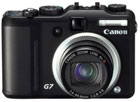 For
mountain climbers there are several considerations: size, weight, battery life
and optics. For trekking, I suggest larger cameras, even Digital SLRs, since
weight in often not a primary consideration. When
climbing, use smaller pocket-sized models that are easy to use. An
excellent source of information is from Thom Hogan, an expert in
Photography. Look at his Take
Hike with a Digital Camera article. Finally make sure you have a viewfinder
on any camera you buy for climbing but more manufactures are leaving
them off to save money and use the space for larger LCDs. LCDs eat
batteries and sometimes are just not bright enough for bright outdoor
conditions such as snow and ice on a sunny day. There are a few "must haves" for
me in a camera I use during hiking, trekking or climbing. For
mountain climbers there are several considerations: size, weight, battery life
and optics. For trekking, I suggest larger cameras, even Digital SLRs, since
weight in often not a primary consideration. When
climbing, use smaller pocket-sized models that are easy to use. An
excellent source of information is from Thom Hogan, an expert in
Photography. Look at his Take
Hike with a Digital Camera article. Finally make sure you have a viewfinder
on any camera you buy for climbing but more manufactures are leaving
them off to save money and use the space for larger LCDs. LCDs eat
batteries and sometimes are just not bright enough for bright outdoor
conditions such as snow and ice on a sunny day. There are a few "must haves" for
me in a camera I use during hiking, trekking or climbing. This is how I evaluate future purchases for climbing cameras: - pocket size for climbing (any non-DSLR) - at least 4X optical zoom - forget about digital zoom all together - true image stabilization e.g. lens or sensor moves - optical view finder if possible - do not depend on LCD because: 1)cannot see in bright sun, 2)eats batteries, 3)arm-length grip creates image blur without stabilization - excellent physical build quality that can withstand rough treatment - excellent image quality (research on DPreview.com) - sufficient mega pixels for cropping and large prints - 6 to 10 mp - but mp are not the key factor in image quality. It is a combination of the image pipeline, quality of lens/optics and software in the camera. But in the end it is the amount of available light! - 30 frames per second (FPS) in video mode For hiking or trekking cameras, I make these considerations: - big zoom e.g. 200mm+ - fast shot to shot time to capture animals or children - as lightweight and compact as possible but I am wiling to trade this off for other features - manual controls Here are some ideas on cameras, printers and photo management software and internet sharing sites. Everybody has a favorite but these are representative of what is available as of late 2013. DIGITAL CAMERAS
PHOTO PRINTERS
PHOTO SHARING WEBSITES
PHOTO EDITING SOFTWARE
PHOTO EDITING SOFTWARE for iPhone
|
|